
Mailaya
用你自己电脑上的 Laya 模型整理网页版 Gmail 和 Outlook。邮件只在本机分析,不会离开你的电脑。
安装
Mailaya 分两部分:浏览器扩展,和负责模型判断的本地 Laya 服务。只装扩展也能用:链接检查、发件人检查和发送前的附件、主题检查不依赖模型。重要度、待回复和「问一问」需要本地服务。
1. 安装扩展
- 下载 mailaya-0.7.0.zip,解压到一个会一直保留的文件夹(比如「文稿/Mailaya」)。
- 在 Chrome 地址栏打开
chrome://extensions,打开右上角的「开发者模式」。 - 点「加载已解压的扩展程序」,选择刚才解压出的文件夹(里面直接有
manifest.json)。 - 刷新已经打开的 Gmail / Outlook 页面。
2. 安装本地服务(macOS)
需要:macOS(Apple Silicon 最快,会用到 GPU)、约 3 GB 磁盘、约 4 GB 空闲内存。
- 下载 mailaya-server-0.7.0.zip,解压到一个会一直保留的位置。服务会从这个文件夹运行。
- 打开「终端」,进入文件夹并运行:
脚本会依次:安装 uv(Python 包管理器)→ 建立 Python 环境并安装 Laya → 下载模型(约 3 GB,只需一次)并自检 → 注册为登录后自动启动、崩溃自动重启的服务。首次大约 5 分钟。cd ~/Downloads/mailaya-server ./setup.sh - 看到
Ready.就好了。之后每次登录,服务大约 40 秒加载完模型。
检查服务:curl -s http://127.0.0.1:8765/health,看到 "status": "ready"。扩展的设置页顶部也会显示「本地服务:在线」。
使用
收件箱
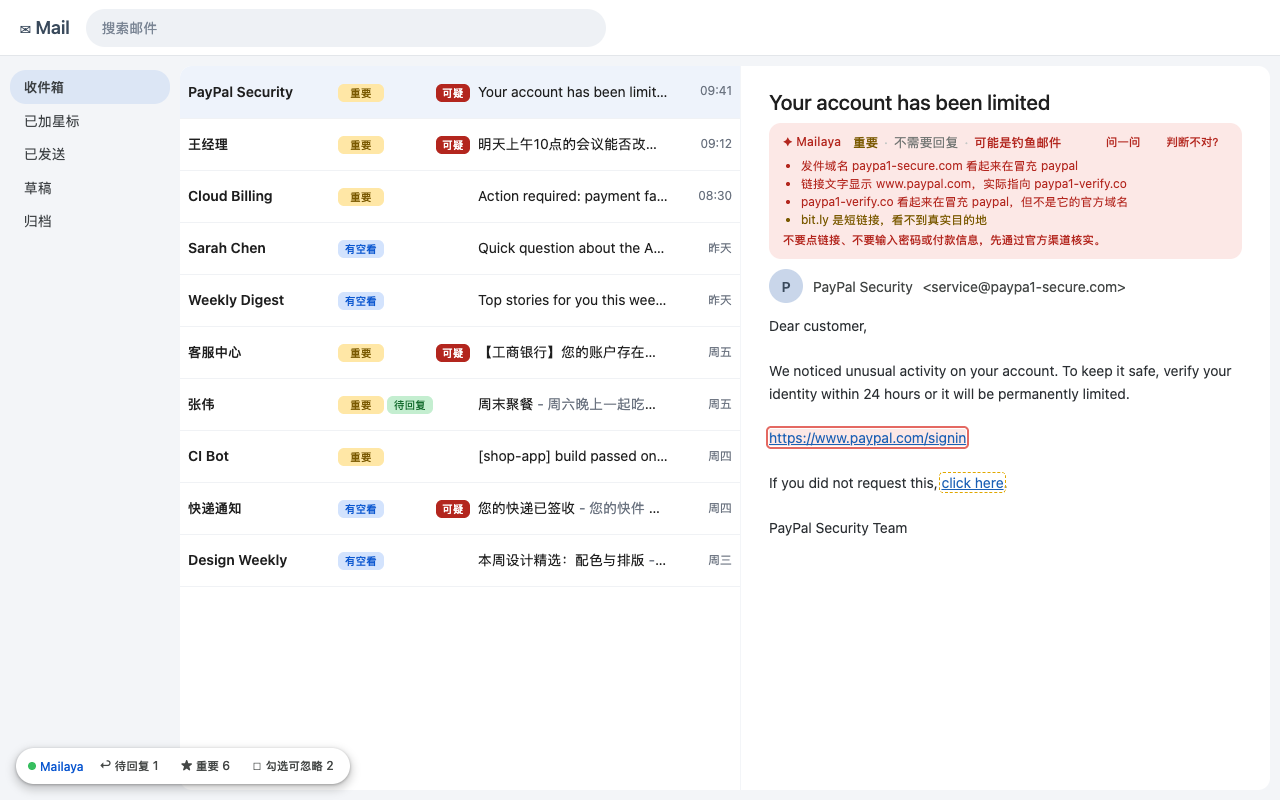
- 每封邮件主题前有一组等宽的标记:重要度(可忽略 / 有空看 / 重要 / 紧急)、待回复、可疑。鼠标悬停可以看到具体概率。
- 左下角的工具条:待回复、重要两个筛选按钮,只看对应的邮件;勾选可忽略会勾选通知、订阅类里不重要的邮件,只勾选,归档或删除由你自己点 Gmail / Outlook 的按钮。
- 点工具栏里的 Mailaya 图标,打开待回复清单:最近判为需要回复、你还没回的邮件。你回复后会自动移出,也可以手动点「已处理」。
打开一封邮件
- 正文上方一行摘要,例如「重要 · 不需要回复 · 未发现风险」。
- 链接与发件人检查:链接文字和实际地址不符、冒充 PayPal / 银行 / Apple 等的域名、直接指向 IP 的链接、短链接。发现高风险时整条变红,并在正文里用红框标出那条链接。
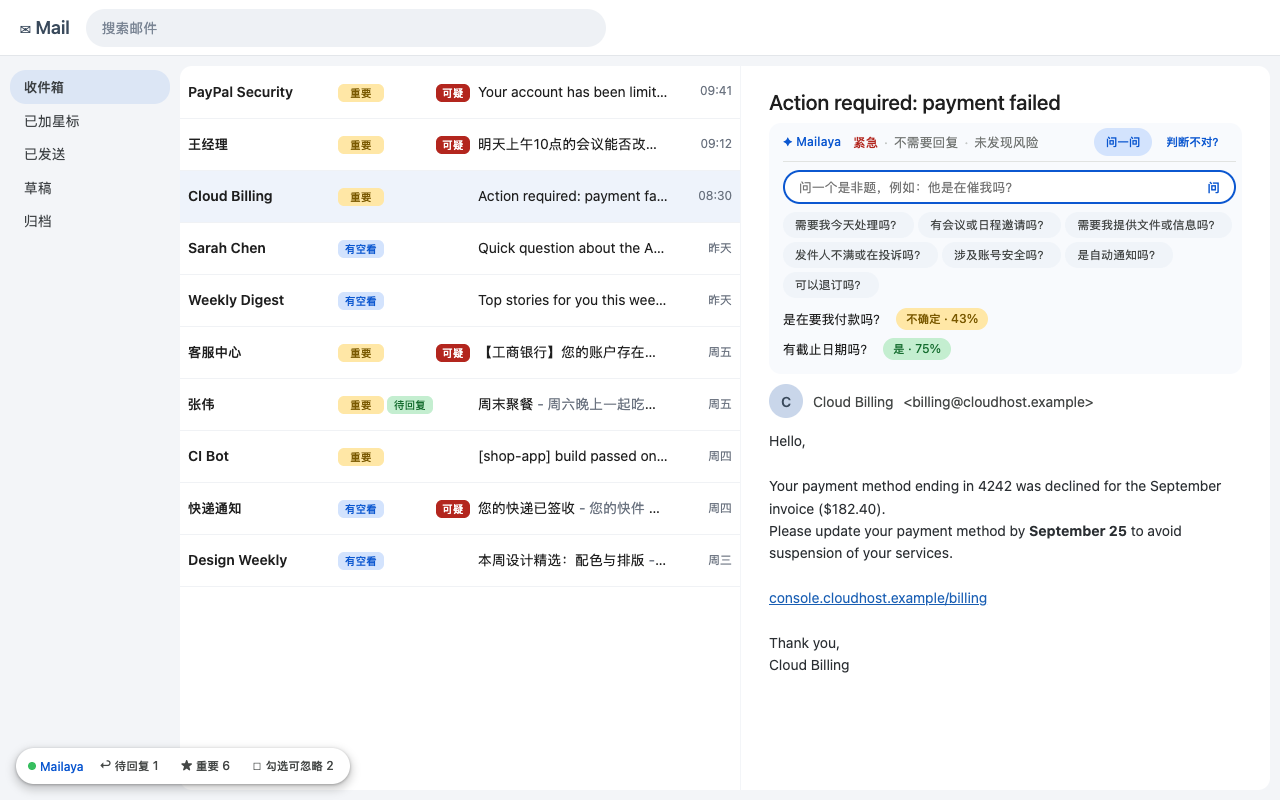
- 问一问:一键提问(需要我今天处理吗?有截止日期吗?是在要我付款吗?……),或输入你自己的是非题。回答是「是 / 否 / 不确定」加概率;问过的会保留,下次打开还在。
写邮件
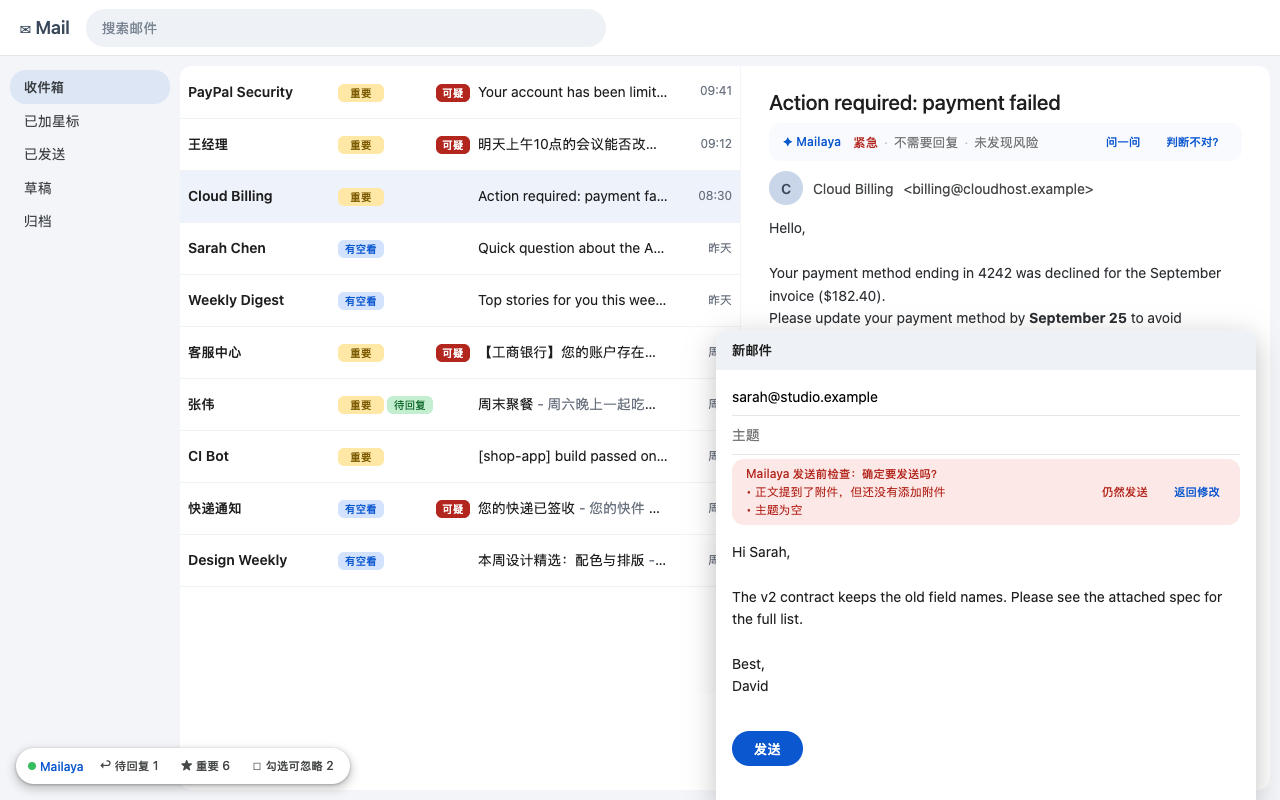
写了「见附件 / attached」却没加附件、主题为空、语气可能过激时,正文上方会提示。只有发现问题时,点「发送」才会拦一次请你确认;点「仍然发送」照常发出。没有问题时完全不干预。
纠错与设置
- 点列表里的标记,或打开邮件后点「判断不对?」,告诉 Mailaya 实际情况。设置页会统计你自己邮件上的准确率,攒够 10 条后给出建议阈值,一键应用。
- 设置页(工具栏图标 → 右上角「设置」):开关各项判断、调阈值、添加自定义问题(写一句是非题,概率超过阈值就显示你起的标签)、清空判断缓存、导出纠错数据。
准确性
Laya 是零样本判断,没有针对你的邮件训练过。在我们的小规模测试里:
| 判断 | 表现 |
|---|---|
| 钓鱼 / 可疑 | 较可靠。再加上链接和发件人的规则检查,是最值得信任的部分。 |
| 待回复 | 中等。自动发件人(noreply、通知)和可疑邮件不会被标待回复。 |
| 重要度 | 实验性,接近随机。请当参考。 |
| 问一问、自定义问题 | 取决于问题,时间细节(「今天」还是「这周」)容易判错。 |
所以 Mailaya 只提示、不替你处理邮件。用「纠错」可以看到它在你邮件上的真实准确率。
常见问题
装好了但邮件上什么都没出现
刷新 Gmail / Outlook 页面。每次更新或重新加载扩展后,都要刷新已经打开的邮件页面,否则页面里还是旧脚本,会提示「Mailaya 已更新,请刷新页面」。
显示「本机模型未连接,只做了规则检查」
本地服务没运行。在终端里再运行一次 ./setup.sh(已完成的步骤会自动跳过),或查看日志 ~/Library/Logs/laya-server.log。刚登录后的 40 秒里服务还在加载模型,显示「加载模型中」属于正常。
Outlook 上有什么不同
支持 outlook.live.com(个人账号),工作账号(outlook.office.com 等)已启用但测试较少。待回复清单里的 Outlook 邮件点开只会回到收件箱,定位不到那一封。
不是 Mac 能用吗
扩展可以;本地服务需要手动运行,见安装包里的 README.txt。没有 Apple GPU 时用 CPU,会明显慢。
判断结果会重新计算吗
不会,结果缓存在本机,刷新页面直接显示。修改了问题(比如新增自定义问题)才会重新判断;只改阈值不用。
更新与卸载
- 更新扩展:下载新 zip,解压覆盖到原来的文件夹,在
chrome://extensions点扩展卡片上的刷新图标,再刷新邮件页面。数据会保留。 - 卸载扩展:在
chrome://extensions移除即可,浏览器里存的所有 Mailaya 数据会一起删除。 - 卸载本地服务:在 mailaya-server 文件夹运行
./setup.sh uninstall。模型文件在~/.cache/huggingface,不需要可以删除,释放约 3 GB。
隐私细节见 隐私说明。问题反馈:[email protected]
Mailaya 与 Google、Microsoft 无关联。Gmail 是 Google LLC 的商标,Outlook 是 Microsoft Corporation 的商标。Laya 由 Convai Innovations 以 Apache-2.0 协议开源。
Mailaya
Triage Gmail and Outlook on the web with a Laya model running on your own computer. Mail is analysed locally and never leaves your machine.
Install
Mailaya has two parts: the browser extension, and the local Laya service that does the model work. The extension alone already runs the link, sender and draft attachment/subject checks; importance, needs-reply and “Ask” need the service.
1. The extension
- Download mailaya-0.7.0.zip and unzip it into a folder you keep (e.g. Documents/Mailaya).
- Open
chrome://extensionsand switch on Developer mode (top right). - Click Load unpacked and pick the unzipped folder (the one that contains
manifest.json). - Reload any open Gmail / Outlook tab.
2. The local service (macOS)
Needs macOS (Apple Silicon is fastest, it uses the GPU), about 3 GB of disk and 4 GB of free memory.
- Download mailaya-server-0.7.0.zip and unzip it somewhere permanent; the service runs from that folder.
- In Terminal:
It installs uv (a Python package manager), a Python environment with Laya, downloads the models (~3 GB, once) with a self-test, and registers a login service that restarts on crash. About 5 minutes the first time.cd ~/Downloads/mailaya-server ./setup.sh - Done when it prints
Ready.After each login the service takes ~40 s to load.
Check it with curl -s http://127.0.0.1:8765/health → "status": "ready"; the extension's settings page also shows the service as online.
Use
Inbox
- Before every subject, fixed-width badges: importance (ignorable / when convenient / important / urgent), needs reply, suspicious. Hover for the probabilities.
- Bottom-left bar: needs reply and important filters; select ignorable ticks unimportant notifications and newsletters — it only ticks boxes, archiving or deleting stays your click.
- The Mailaya toolbar icon opens the pending-reply list: recent mail that still needs your answer. Replying removes it; you can also mark it done.
An opened mail
- A one-line summary above the body, e.g. “important · no reply needed · no risk found”.
- Link & sender check: link text that differs from its target, look-alike domains of PayPal / banks / Apple etc., links to bare IPs, URL shorteners. High risk turns the bar red and outlines the link in the mail.
- Ask: one-click questions (do I need to act today? is there a deadline? am I asked to pay?) or your own yes/no question. Answers are yes / no / unsure with a probability, and stay there when you reopen the mail.
Writing
Mentioning an attachment without attaching one, an empty subject, or a possibly hostile tone shows a note above the body. Only then does clicking Send ask you to confirm once; “send anyway” sends normally. Otherwise sending is never touched.
Corrections & settings
- Click a badge, or “wrong?” on an opened mail, to tell Mailaya what the mail really is. Settings then shows its accuracy on your own mail and, after 10 corrections, suggests thresholds.
- Settings (toolbar icon → Settings): toggle each judgment, thresholds, custom questions (a yes/no question with your own label), clear the cache, export corrections.
Accuracy
Laya judges zero-shot; it was never trained on your mail. In our small tests:
| Judgment | How it does |
|---|---|
| Phishing / suspicious | Fairly reliable; with the link and sender rules this is the most trustworthy part. |
| Needs reply | Moderate. Automated senders and suspicious mail are never marked. |
| Importance | Experimental, close to chance. Treat as a hint. |
| Ask, custom questions | Depends on the question; timing details (“today” vs “this week”) trip it up. |
That's why Mailaya only suggests and never acts on your mail. Corrections show how it does on yours.
FAQ
Installed, but nothing shows on my mail
Reload the Gmail / Outlook tab. After every update or reload of the extension, reload open mail tabs; otherwise the page keeps the old script and says the extension was updated.
“Local model not connected, rules only”
The service isn't running. Run ./setup.sh again (finished steps are skipped) or read ~/Library/Logs/laya-server.log. For ~40 s after login it is still loading, which is normal.
Outlook differences
outlook.live.com (personal) is supported; work accounts (outlook.office.com …) are enabled but less tested. Outlook entries in the pending-reply list open the inbox, not the exact mail.
Not on a Mac?
The extension works; run the service by hand as described in the bundle's README.txt. Without an Apple GPU it runs on CPU, noticeably slower.
Does it re-analyse mail on every reload?
No, results are cached locally. Changing the questions (e.g. adding a custom one) re-analyses; changing thresholds doesn't.
Update & remove
- Update the extension: unzip the new version over the same folder, click the reload icon on its card in
chrome://extensions, then reload mail tabs. Your data stays. - Remove the extension: remove it in
chrome://extensions; everything Mailaya stored in the browser goes with it. - Remove the service: run
./setup.sh uninstallin the mailaya-server folder. The models live in~/.cache/huggingface; delete them to free ~3 GB.
Details in the privacy policy. Feedback: [email protected]
Mailaya is not affiliated with Google or Microsoft. Gmail is a trademark of Google LLC; Outlook is a trademark of Microsoft Corporation. Laya is open source (Apache-2.0) by Convai Innovations.